Read prices from any country,
the way people write them.
A TypeScript library for text and HTML. It returns the exact amount and the ISO currency, and tells you when the currency is a guess.
Free and open source · zero dependencies · no AI, no network
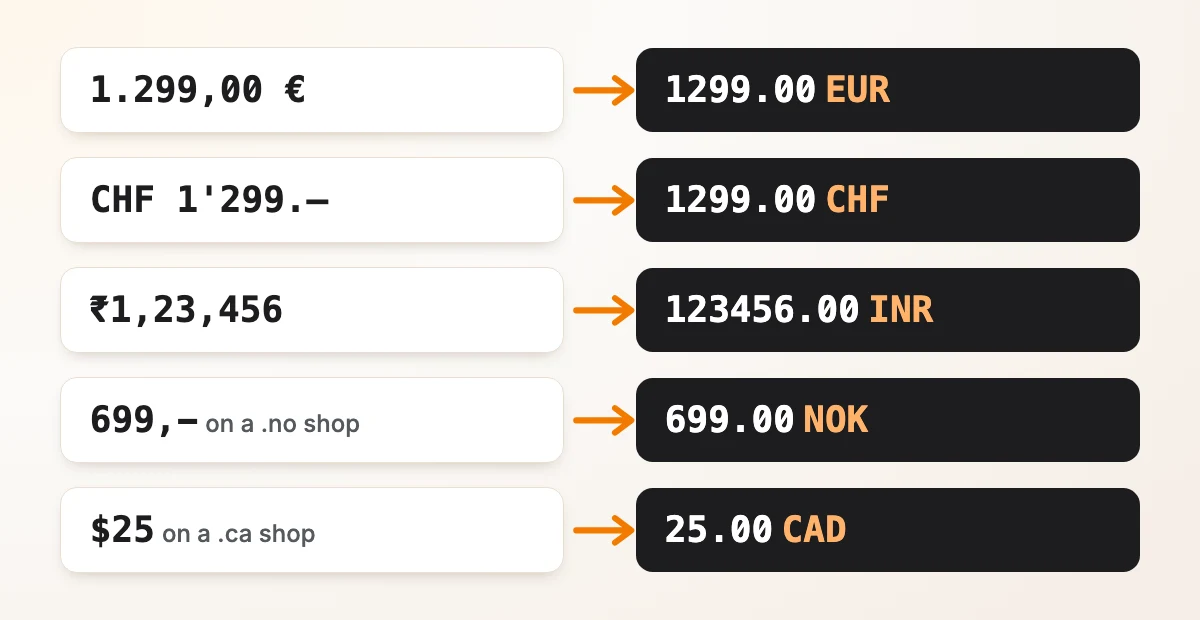
What it reads
Prices as shops write them, and what the library returns. A question mark means the currency is the most likely one, not a certain one.
| Written as | Reads as | Why |
|---|---|---|
1.299,00 € | 1299.00 EUR | the € symbol |
CHF 1'299.– | 1299.00 CHF | the code; .– means no cents |
12,- 3.999.- 5 990.- | 12.00 3999.00 5990.00 | whole amounts written with a dash |
₹1,23,456 | 123456.00 INR | Indian digit grouping |
59.900 د.ك | 59.900 KWD | the dinar has three decimals |
٣٤٫٥٠ ر.س | 34.50 SAR | Arabic-Indic digits |
$25 on a .ca shop | 25.00 CAD | the domain |
$25 alone | 25.00 USD? | most likely; could be CAD, AUD and 27 more |
kr 299 on a Shopify shop set to NOK | 299.00 NOK | the shop's active currency |
¥12,800 | 12800 JPY? | could be CNY; yen has no decimals |
<del>$79.99</del> $59<sup>99</sup> | 59.99 USD?, and 79.99 marked struck | the old price is flagged; cents in <sup> |
29,99 €/kg 199 lei/lună | 29.99 EUR per kg, 199.00 RON? per month | units in every CLDR language; lei could be MDL |
1.234 with no currency | 1234.00, or 1.234 | both readings are returned |
Every row is the library's real output. It was also checked on 39 product pages from shops in 26 countries.
Install and use
TypeScript for Node.js 18 or later and browsers, plus Python and PHP ports that read the same data and give the same results.
| JavaScript, TypeScript | npm install global-price-parser |
|---|---|
| Python 3.9+ | pip install global-price-parser |
| PHP 8.1+ | composer require dontpayfull/global-price-parser |
-
Step 1: Read a price from text
import { parsePrice, parsePrices } from 'global-price-parser' parsePrice('1.299,00 €') // { amount: '1299.00', currency: 'EUR', currencySure: true, ... } parsePrices('Abo: 9,99 €/Monat, Set ab 1.299,00 €') // 9.99 EUR per month, 1299.00 EUR -
Step 2: Or from HTML and the page around it
// an HTML string
parsePrice('<del>$79.99</del> <ins>$59<sup>99</sup></ins>')

// a DOM element, in the browser or with jsdom
parsePrice(document.querySelector('.product-price'))

// what you know about the shop
parsePrice('$25', { url: 'https://shop.example.ca/p/1' })
parsePrice('kr 299', { country: 'NO' })
With a DOM element it also reads the signals of its page. With a string, pass the page as
{ page: html }.
Every option and field is in the README. Python and PHP: Python README, PHP README.
How it picks the currency
The symbol next to the number always wins: 25 € is EUR on any page. Signals only choose between the currencies a symbol can mean, such as USD, CAD or AUD for $, or SEK, NOK, DKK or ISK for kr.
| 1. Your options | { currency: 'CAD' }, { country: 'NO' }, { language: 'de-CH' } |
|---|---|
| 2. Shop platform | the active currency in Shopify, BigCommerce, PrestaShop, Magento, VTEX, WooCommerce and Shopware |
| 3. Tracking | dataLayer ecommerce, gtag, Meta pixel, Klaviyo |
| 4. Structured data | JSON-LD priceCurrency, microdata, og:price:currency |
| 5. URL | ?currency=CAD |
| 6. Country of the page | Shopify or PrestaShop country, ?country=CA, the page's own hreflang, <html lang="en-CA">, /en-ca/ or /ca/fr/ in the path, the .ca domain |
| 7. Nothing found | the most common currency for the symbol, with currencySure: false |
Some signals are left out on purpose because they mislead: the Shopify base currency, og:locale, <html lang> without a country, and domains like .co, .io or .ai. A language without a country in your options, like { language: 'en' }, only guesses. The result names the signal that decided in decidedBy.
Limits
- A separator followed by exactly three digits groups thousands, unless the currency has three decimals: a fuel price like
1,799 €/lreads as 1799.00 EUR. - Accounting brackets are not read as negative:
(15.00)is 15.00. - Plain text has no struck prices. In
Was $59.99, now $39.99the first price comes first; use HTML, orparsePricesand choose. - It does not run the page's JavaScript, convert currencies, or read amounts written in words.
Questions
Why not Intl.NumberFormat or a regex?
Intl.NumberFormat writes prices but cannot read them back. A regex like /[^0-9.]/g turns 1.299,00 € into 1.29900. Real pages mix both separators, local symbols and markup.
Why is the amount a string?
So that it stays exact and keeps the currency's decimals: "1299" for JPY, "1299.00" for EUR, "59.900" for KWD. The same amount is also there as a number, in value.
What does currencySure: false mean?
More than one currency was possible and nothing on the page decided. The currency returned is the most common one for that symbol; the others are in otherCurrencies.
Does it use AI or send data anywhere?
No. It is plain code with currency data from Unicode CLDR built in. It makes no network calls, and the same input always gives the same output.
I use price-parser in Python. Is this the same?
It covers the same ground, and adds HTML and the page signals above. It has a Python version too: pip install global-price-parser.
What is the license?
Apache-2.0, free for commercial use. If it helps you, a mention of DontPayFull is welcome. Issues and pull requests are welcome on GitHub.