5.00 out of 1 votes

How to Save Money on Amazon: 20 Tricks Most Shoppers Miss
Most Amazon shoppers use just a fraction of the savings tools available. This guide covers 20 ways to save money on Amazon, from deal stacking and price tracking to lesser-known sections like Woot! and Amazon Haul.
Ever wonder why two people can buy the exact same item on Amazon and pay completely different prices? One got there on the right day, stacked three discounts, and paid 22% less. The other just hit “Buy Now.”
That gap is what this article is about. Three in four U.S. households are now Amazon Prime members, yet most use only a fraction of the savings tools available. The tricks here aren’t complicated. Most just require knowing they exist.
We track deals and coupon codes across hundreds of stores, and Amazon is one of the most tool-rich places for stacking discounts. This guide covers 20 tricks, starting with the ones that appear on almost no other list.
Key Takeaways
- ✓ Amazon changes prices on 2.5 million products daily. Buying without a strategy means routinely overpaying.
- ✓ Stacking discounts (coupon + Subscribe & Save + Prime Visa + cashback) can push savings past 20% on a single purchase.
- ✓ Only 23% of Amazon customers use Subscribe & Save despite consistent 5-15% savings on everyday items.
- ✓ Prime has 4 pricing tiers, and most shoppers don’t know about the $6.99/month and $69/year options.
- ✓ Woot!, Amazon Haul, and the Rufus AI price-targeting tool are widely unknown savings vehicles hiding in plain sight.
Why Most Shoppers Leave Money on the Table at Amazon
Amazon’s scale is hard to grasp. Prime membership reached 201 million U.S. customers in late 2025, and the average Prime household spends $1,170 per year on the platform. Compare that to non-members at $570. That’s a lot of transactions where savings tools go untouched.
And get this: Amazon adjusts prices on roughly 2.5 million products every single day. A kitchen appliance priced at $89 on Monday could drop to $64 by Thursday and bounce back up the following week. Without a strategy, you’re buying at random within that range.
75%
U.S. households with Prime
2.5M
price changes per day
23%
use Subscribe & Save
Only 23% of Amazon customers have an active Subscribe & Save order, even though it saves 5-15% on nearly every household consumable. The other 77% are paying full price on items they buy every month.
The 20 tricks below are organized from the highest-impact and least-known to the more familiar (but still underused) tools. Start at the top.
The Tricks Most Shoppers Actually Miss (Start Here)
Before the full list, it’s worth pointing out the tricks that almost never appear in other guides. After analyzing competitor articles, one thing is clear: deal stacking, Amazon’s sale calendar, Woot!, Rufus AI, and Prime membership tiers aren’t in the major roundups. These aren’t obscure features. They’re just under-covered.
The rest of this article covers all 20 tricks. But if you only use a handful, start with these first five.
Trick 1: Stack Multiple Discounts on a Single Purchase
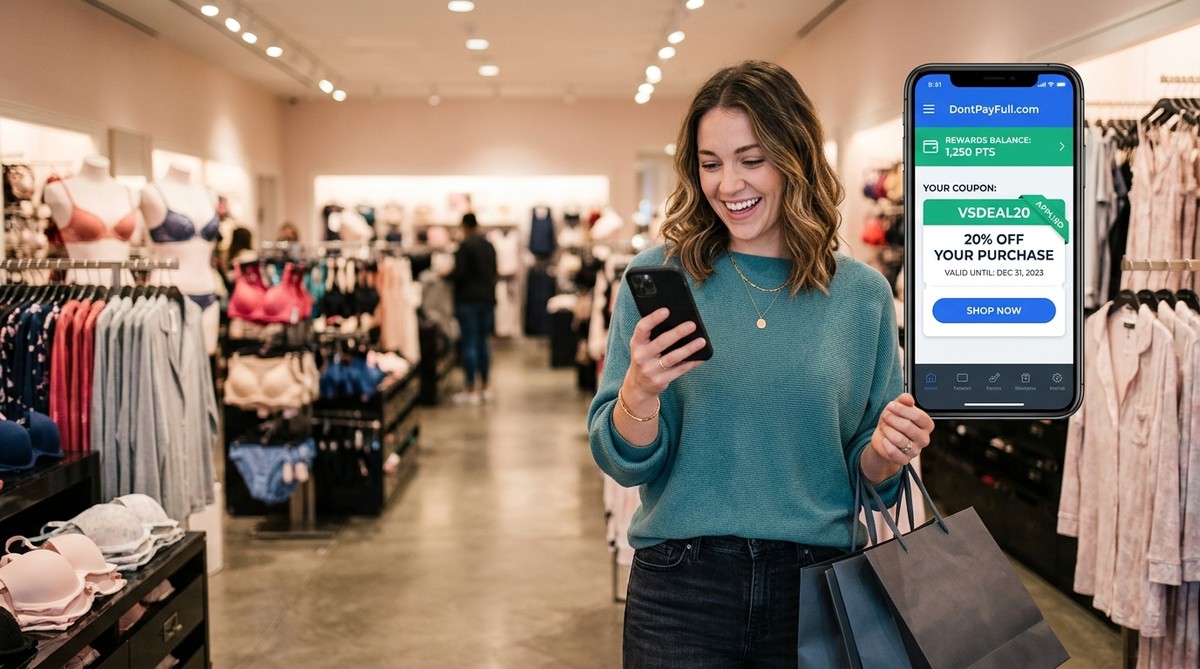
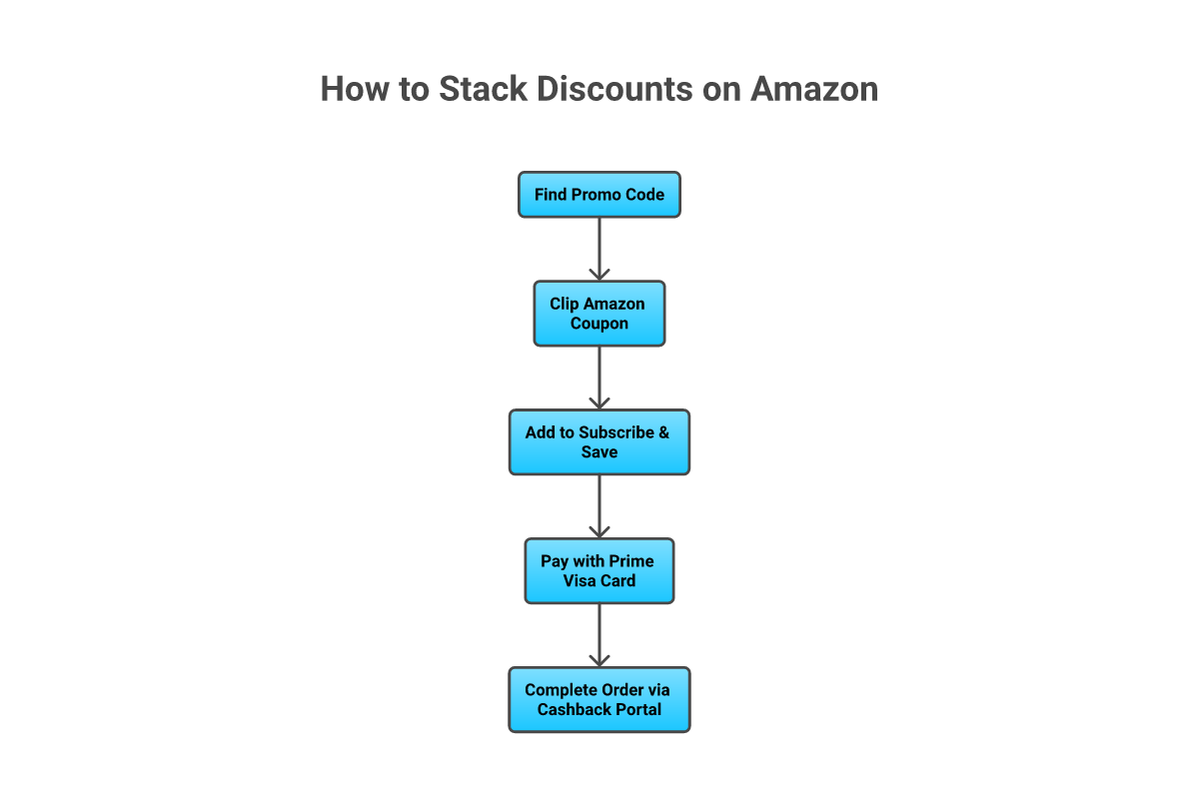
Deal stacking is a powerful savings technique on Amazon, and it’s one that most guides skip. The formula is simple: apply a promo code from a site like DontPayFull at checkout, clip the on-page Amazon coupon for the same item, add Subscribe & Save for 5-15% off, pay with a Prime Visa for 5% cashback, and run it through a cashback portal on top.
On a household consumable, that layering can hit 20% or more off the listed price. Electronics work well with the promo code plus Prime Visa combination, since Subscribe & Save doesn’t apply. Consumables like laundry detergent, vitamins, and coffee are the sweet spot for all five layers.
One thing to check: not every discount type stacks. Amazon’s clip coupons can usually be combined with Subscribe & Save, but some promotional codes specifically exclude S&S items. Read the coupon terms before you assume they’ll stack.
From processing millions of coupon codes across all major retailers, we’ve noticed Amazon codes have the most complex stacking rules of any platform. The codes that work best with other discounts are usually percentage-off codes tied to specific product categories, not sitewide codes. Sitewide promo codes almost always exclude Subscribe & Save items, the exact combination most shoppers want to use.
Trick 2: Know Amazon’s Sales Calendar
Amazon now runs four major sale events per year, and knowing which categories to buy during each one changes how you shop all year.
Prime Day 2025 drove $24.1 billion in U.S. online spending over four days in July, up 30.3% year over year. That’s the equivalent of more than two Black Fridays combined. And 25.3% of Amazon products were discounted during Prime Day 2025, up from 23.6% the prior year.
Here’s how to use the calendar by category:
- Big Spring Sale (late March): Best for home goods, bedding, small kitchen appliances, and fashion
- Prime Day (July, 4 days): Best window for electronics, laptops, tablets, smart home devices
- Prime Big Deal Days (October): Strong for household essentials ahead of the holidays
- Black Friday/Cyber Monday (November): Best for large TVs, major appliances, and gaming hardware
If you have a big purchase coming up, check which event is nearest and whether your category historically sees its deepest discounts then. The DontPayFull Amazon deals page tracks prices before and during each event so you can compare against real historical lows.
Trick 3: Shop Woot! for Up to 96% Off
Woot.com is an Amazon-owned daily deals site that most U.S. shoppers have never heard of. It sells electronics, clothing, and home goods at discounts up to 96% off, usually in limited quantities and for short time windows.
Prime members get free standard shipping on all Woot! orders. Non-Prime shoppers pay a flat $6 fee, which is still often worth it given the discount depth. The selection rotates daily, so it’s worth bookmarking and checking before any electronics purchase on the main Amazon site. You might find the same product category (or even the same item) at a fraction of the price.
Trick 4: Use Rufus AI to Set a Target Price
Rufus Auto-Buy is a Prime-exclusive feature in the Amazon Shopping app that lets you set a target price for any product. When the price hits your target, Rufus automatically completes the purchase. No monitoring required. It stays active for up to six months.
Beyond auto-purchasing, Rufus shows 30-day and 90-day price history directly in the app and offers “Help Me Decide” comparisons between similar products. To access it, open the Amazon Shopping app and look for the Rufus chat icon at the bottom of any product page.
Best use case: any big-ticket item you need but aren’t in a rush to buy. Set a target 15-20% below the current price and wait. Since 30-40% of Amazon products drop in price within 30 days of purchase, the wait is often shorter than you’d think.
Is Amazon Prime Worth It? Choose the Right Membership Tier
Most people don’t know Prime has four pricing tiers, not one.
Best Value
Standard Prime
$139/yr
- + All Prime benefits included
- + Free 2-day shipping
- + Prime Video, Music, Gaming
- + Or $14.99/month option
Prime Access
$6.99/mo
- + For SNAP, Medicaid, SSI recipients
- + Same shipping & streaming perks
- + Verify at Amazon.com/snap
The four tiers are: Standard ($139/year or $14.99/month), Young Adults 18-24 ($69/year or $7.49/month), Prime Access for government assistance recipients ($6.99/month), and Prime Video Only ($8.99/month). The Young Adults and Prime Access tiers get you the same shipping and streaming benefits as Standard Prime at a much lower price.
Is Prime worth it at full price? The math works out if you order regularly. CIRP data shows Prime members save roughly $600 more per year than non-members. At $139 annually, that’s a strong return if you’re placing 15 or more orders per year. For lighter users, free shipping on orders over $35 is worth knowing before you subscribe.
Clip Amazon Coupons Before Every Purchase
On most Amazon product pages, there’s an orange “Clip Coupon” checkbox beneath the price. It’s easy to miss, and clicking it isn’t automatic. You have to click the box to activate the discount. If you skip this step, the coupon doesn’t apply at checkout.
Amazon also has a dedicated Coupons page that aggregates every available deal by category. Browsing it before a purchase takes about 30 seconds and can uncover savings you’d never find on the individual product page. Combine a clipped coupon with Subscribe & Save on eligible items and you’re getting double savings with no extra work.
The Amazon coupons and promo codes on DontPayFull go through regular testing, so you’re not hunting through expired codes by hand. If you prefer automatic code-testing at checkout, DontPayFull’s browser extension applies them for you.
Set Up Subscribe & Save for Household Staples
Subscribe & Save gives you 5% off with one to four active subscriptions, and up to 15% off when you have five or more subscriptions delivering to one address in a month. It applies to thousands of everyday items: laundry detergent, coffee, protein powder, vitamins, diapers, and paper products.
The underused part: you can subscribe, get the discount on a single delivery, and then cancel with no penalty. So even if you only need something once, there’s a free savings layer waiting for you. Cancel after the first delivery and you’ve still paid 5-15% less than the regular price.
💡
Tip: Combine a clipped Amazon coupon with Subscribe & Save on your first order for double savings, then cancel the subscription before the second delivery if you don’t need recurring shipments.
Track Prices with CamelCamelCamel and Keepa
Before any purchase over $50, it’s worth taking 60 seconds to check the price history. Here’s why: Amazon changes prices on 2.5 million products daily, and a product sitting at $89 today may have been $64 just a few weeks ago.
CamelCamelCamel is a free tool that shows the full price history for any Amazon product. Enter the product URL or search by name, and you’ll see a chart of price highs and lows going back years. One thing to know: CamelCamelCamel doesn’t include shipping costs in its pricing data, so the chart reflects the item price only.
Keepa is a browser extension that overlays price history directly on the Amazon product page, so there’s no need to visit a separate site. Both tools serve the same purpose; Keepa is just more convenient for frequent shoppers who check prices regularly.
If prices do drop within a few days of a purchase you’ve already made, it’s worth contacting Amazon customer service. They often issue the difference as a gift card credit, especially for Prime members.
Shop Amazon Warehouse and Resale Deals
Amazon Warehouse (now called Amazon Resale) sells returned, open-box, and refurbished items that have gone through a quality inspection before being relisted. Discounts vary by condition grade:
- Like New: 15-30% off (typically indistinguishable from new)
- Very Good: 30-45% off (minor cosmetic wear, fully functional)
- Good: 40-60% off (visible wear, works normally)
- Acceptable: 50-70%+ off (noticeable wear, functional only)
“Like New” is the sweet spot for most shoppers. These are usually items returned because a buyer changed their mind, not because something was wrong. For electronics, small appliances, and kitchen gear, this is a great discount channel. Amazon Renewed is a separate section covering refurbished electronics with a 90-day warranty.
Earn 5% Back with the Amazon Prime Visa
The Prime Visa from Chase earns 5% back on Amazon, Whole Foods, and Chase Travel, 2% at restaurants and gas stations, and 1% everywhere else. No annual fee. For shoppers spending the average Prime amount of $1,170/year on Amazon, the 5% cashback alone generates about $58.50 annually. That covers the membership cost for some Prime users.
The non-Prime Amazon Visa earns 3% instead of 5% on Amazon and Whole Foods. It’s still useful, especially for non-Prime shoppers who hit the $35 free shipping threshold regularly.
Combine the Prime Visa with Subscribe & Save and a clipped coupon on a single consumable purchase, and you’re stacking three savings layers without any couponing effort beyond a click.
No-Rush Shipping: Earn Digital Credits on Orders You Can Wait For
Prime members can earn $1-$3 in digital credits per order by choosing No-Rush Shipping at checkout instead of the default 2-day option. The credit applies to Kindle eBooks, Prime Video rentals, digital music, and app purchases.
Credits expire in 3-6 months, so it’s worth setting a reminder to use them. For any order where you don’t need the item urgently, No-Rush is a free digital store credit. Over a year of regular shopping, these credits can really add up.
Amazon also lets you “Add to Delivery” to consolidate multiple packages into a single shipment, which can unlock additional No-Rush rewards in some cases.
Shop Amazon Haul for Ultra-Low-Price Items
Amazon Haul is a mobile-only shopping section where every item is priced at $20 or less, most are under $10, and some are as low as $1. Shipping is free on orders over $25, or $3.99 below that.
It’s best for household basics, party supplies, disposable items, and accessories where brand doesn’t matter. Not the place for tech or anything where quality is a concern. But for grabbing a pack of command strips, packing supplies, or basic kitchen tools, it’s worth checking before buying the same thing on the main site at 3x the price.
Compare Amazon Haul to Amazon Outlet for a different savings angle. Outlet sells overstock brand-name items at up to 80% off. Two different sections, both worth a look before you finalize any order.
Trade In Old Electronics for Amazon Credit
Amazon Trade-In lets you submit eligible electronics (phones, tablets, Bluetooth speakers, routers, video games) for Amazon gift card credit. The program includes a free prepaid shipping label, and after completing a trade-in, you get 20% off a new Amazon device.
The best timing: submit your trade-in before purchasing a replacement, then combine the gift card credit with a Prime Day or Big Spring Sale price. If you’re upgrading devices anyway, the trade-in plus a sale event can cut your out-of-pocket cost. Non-functional devices are recycled, not credited.
Get Free or Faster Shipping Without Paying More
Free standard shipping (5-8 business days) is available on orders over $35, no Prime needed. If your cart is $30 and shipping is $5.99, adding a $5 item to hit the $35 threshold often costs less than paying the shipping fee. Or check Amazon Haul, where a low-cost addition might get you over the threshold.
For Prime members who need something immediately, 1-hour delivery is $9.99 and 3-hour delivery is $4.99 in many cities. Buy Online, Pick Up in Store is also available for select items regardless of order total, and it’s free.
Amazon Lists: Get Notified When Prices Drop
Adding items to an Amazon List (Wish List) and enabling notifications means Amazon will alert you when the price drops or a coupon becomes available. This works in the Amazon Shopping app via push notifications.
It’s different from “Save for Later” in your cart. Lists are permanent, shareable, and trigger notifications; Save for Later doesn’t. For items you’re watching but not ready to buy, a List plus CamelCamelCamel alerts gives you two layers of notifications with no ongoing effort.
Browse Amazon Outlet, Renewed, and Resale for Deep Discounts
Three Amazon discount sections most shoppers never think to visit separately:
- Amazon Outlet: Overstock and clearance items, up to 80% off on brand-name products
- Amazon Renewed: Refurbished electronics with a 90-day warranty guarantee
- Amazon Resale: Returned and open-box items graded by condition
You can get to each section directly by URL, or filter search results by condition. The thing to know: the discount depth in Resale and Renewed varies widely by item. For some products the markdown is 15%; for others it’s 60%. Always check the section price against the new price before assuming it’s a deal.
Save on Whole Foods with Prime
Prime membership includes exclusive weekly deals at Whole Foods, which you can access by scanning the Prime app at checkout. Prime Visa earns 5% cashback at Whole Foods on top of these in-store discounts, so the savings stack.
Amazon Fresh free grocery delivery is also included with Prime, which makes Prime worth its full price for households that order groceries regularly. And Prime members get about $0.10 per gallon off at participating bp, Amoco, and ampm fuel stations.
Share Prime Benefits with Your Household
Amazon Household lets you share Prime benefits with one other adult plus up to four teens and four children at the same address. An important update from 2025: household sharing is now restricted to members at the same physical address. Sharing with a family member who lives elsewhere is no longer permitted.
For housemates or couples, splitting the $139 annual cost comes out to $69.50 per person. Both accounts get the full set of Prime benefits including shipping, streaming, and grocery delivery. Teen accounts include Prime shipping with parental purchase controls.
Quick Wins: 5 More Tricks Worth Knowing
A few smaller tactics that take almost no time:
- Redeem card points directly at checkout: AMEX Membership Rewards and Chase Ultimate Rewards points can be applied as Amazon credit at checkout.
- Check the Personalized Promotions page: Amazon’s “Your Coupons” or Personalized Promotions page shows deals tailored to your purchase history that don’t always appear on the main coupons page.
- Use Price Per Unit in search results: Filter by unit price when comparing bulk packs vs. single items. The cheapest list price isn’t always the cheapest cost per use.
- Check Today’s Deals daily: Lightning Deals appear and sell out within hours. The deals page refreshes throughout the day.
- Ask for a post-purchase price adjustment: If an item drops in price within a few days of your order, contact Amazon customer service. They often issue the difference as a gift card credit, particularly for Prime members.
🤔
Did You Know: Amazon’s dynamic pricing can cause the same item to oscillate between two prices on a near-weekly cycle. One analysis found a bestselling kitchen appliance cycling between $89 and $64 repeatedly. Price tracking tools let you buy at the low end reliably.
The Bottom Line
Most shoppers leave 10-20% savings on the table at Amazon simply by not knowing these tools exist. The highest-impact starting point is deal stacking: combine a promo code, a clipped coupon, Subscribe & Save, and a Prime Visa on a single household purchase. From there, add price tracking (CamelCamelCamel or Keepa) for purchases over $50, check Woot! before any electronics buy, and time big purchases around Amazon’s four annual sale events. If you qualify for Prime Access ($6.99/month) or Young Adult pricing ($69/year), you’re paying a fraction of the standard rate for the same benefits. None of these tricks require significant time or effort once you build the habit.
Frequently Asked Questions
How do you get a 50% discount on Amazon?
Getting 50% off means combining multiple discount types rather than using a single coupon. The most reliable ways are: buying from Amazon Warehouse (30-70% off depending on condition), shopping during Prime Day or Black Friday when 25%+ of products are discounted, or checking Amazon Outlet for overstock items at up to 80% off. For new items, stacking Subscribe & Save with a clipped coupon and Prime Visa cashback can get you 20-25% off. That’s more realistic than a flat 50% on full-price merchandise.
Is Amazon Prime worth the cost?
At $139/year (or $14.99/month), Prime is worth it for shoppers who order 15 or more times per year. CIRP data shows Prime members spend roughly $600 more annually than non-members, so they get more value from the platform. The break-even math: $139 divided across 15 orders is about $9.27 per order in implied savings. That’s achievable with free 2-day shipping, Subscribe & Save discounts, and Prime-exclusive deals. For lighter shoppers, the free $35 shipping threshold or Prime Video Only at $8.99/month may be a better fit.
How do I get Amazon Prime for $6.99 a month?
This is the Prime Access tier, available to U.S. customers who get qualifying government assistance including SNAP, Medicaid, SSI, TANF, or certain other programs. You can verify eligibility and sign up at Amazon.com/snap. You get the exact same Prime benefits as the standard tier: free 2-day shipping, Prime Video, Prime Music, and exclusive deals. The $6.99 monthly rate is the lowest that Prime offers.
Does Amazon have a price match policy?
Amazon doesn’t have a formal price match policy with other retailers. The platform won’t match prices from Best Buy, Target, or Walmart. What it does offer is a post-purchase price adjustment: if the price drops within a few days of your order, customer service will often issue the difference as a gift card credit. For pre-purchase price matching, your best option is using CamelCamelCamel to check that you’re buying at or near a historical low before ordering.
How do I save money on Amazon without Prime?
Free shipping without Prime is available on orders over $35. Beyond that, the best non-Prime strategies are: clip on-page coupons before every purchase, use Amazon’s Coupons page to browse deals by category, check Amazon Outlet and Amazon Resale for markdowns on returns and overstock, and shop Woot! for daily deals (you’ll pay a $6 flat shipping fee without Prime). Also use CamelCamelCamel to time purchases at price lows. You won’t get Subscribe & Save’s upper tier or Prime Day exclusives, but the savings from these tools are still solid.
Can you combine Amazon coupons with Subscribe & Save?
Yes, in most cases. Clipped Amazon coupons can usually be combined with Subscribe & Save on eligible items, giving you double savings on the same order. The total discount depends on the specific coupon and whether the item qualifies for S&S. Some promotional codes (especially sitewide ones) exclude Subscribe & Save items, so check the terms before assuming they’ll stack. When both do apply, you’re getting the S&S percentage reduction plus the coupon value in one checkout.
Sources
- eMarketer, June 2025: Prime membership penetration (75% of U.S. households)
- CIRP (Consumer Intelligence Research Partners): Prime member spending ($1,170/yr vs $570/yr non-members), Subscribe & Save usage (23%), Prime membership count (201 million)
- Adobe Analytics, July 2025: Prime Day 2025 U.S. spending ($24.1 billion, up 30.3% YoY)
- Momentum Commerce, July 2025: Prime Day 2025 discount depth (25.3% of products discounted)
- Ad Badger, April 2025: Amazon dynamic pricing (2.5 million price changes daily), CamelCamelCamel and Keepa as recommended tools
- TaskMonkey, January 2026: Post-purchase price drop frequency (30-40% of products within 30 days)
- CouponCommando, February 2026: Amazon pricing volatility and price tracking strategies
Do You Have Any Suggestions?
We're always looking for ways to enrich our content on DontPayFull.com. If you have a valuable resource or other suggestion that could enhance our existing content, we would love to hear from you.
Was this content helpful to you?
Related Articles